
Confirming attendance or reminding someone about a task by phone eats hours of your team's time, and each call's result ends up noted by hand. Now Aindez calls from your WhatsApp number and uses the result to keep the process going.
Here's how it works, step by step.
New1 · Turn on voice calls
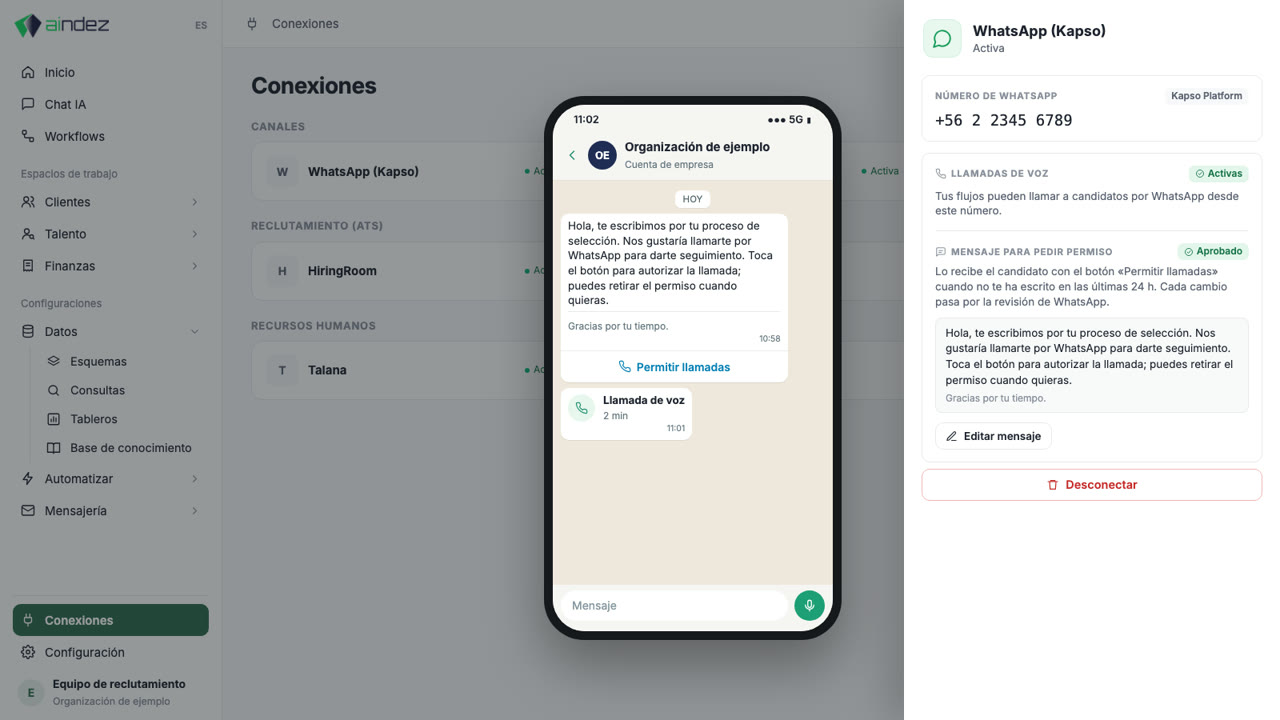
In Connections, on the WhatsApp card, you turn on voice calls for your connected number with a button, with no external setup. You can repeat the activation without duplicate effects. If the number is already sending its events to another system, Aindez doesn't replace it and the card reports it.
New2 · Get the permission template approved
If there is no conversation open in the last 24 hours, WhatsApp only accepts the request for permission to call as an approved template. When you turn on calls, your organization gets its template and the card shows whether it is pending, approved or rejected. If the request falls outside the window, the attempt ends with a clear message about the reason.
New3 · Use the call's result in another workflow
The "When a WhatsApp call ends" event can start another workflow on every outcome: completed, no answer, rejected, permission denied, failed or canceled. The next workflow filters by status and has the result (confirmed, declined, asked to reschedule, no decision), the summary, the end reason and the duration. The result and summary exist only when the person answered.
Improved4 · Contact again on every run
WhatsApp, call and email steps can contact the person on every run, not only the first time. This is useful for reminders. If you don't turn it on, nothing changes: anyone already contacted is skipped.
How we do it
- You turn on calls with one button, and doing it again duplicates nothing.
- We ask for permission before calling, as WhatsApp requires.
- An AI agent holds the conversation and leaves an outcome and a summary.
- We never assume an answer: if nobody picked up, there's no outcome.
In technical terms
- Turning on calls registers a signed webhook; if the number already points to another system, we leave it and let you know.
- Before every call we confirm with Meta that the candidate gave permission; if not, we ask for it over WhatsApp.
- The conversation happens in real time with an AI voice agent, and it's transcribed so your team can review it.
- When it ends, the agent leaves an outcome and a summary, which are only sent if the call was completed.
- Each call is idempotent: every run contacts the person once, and a retry doesn't repeat the call.
Your team stops calling one by one, and each answer is ready for the next step.