
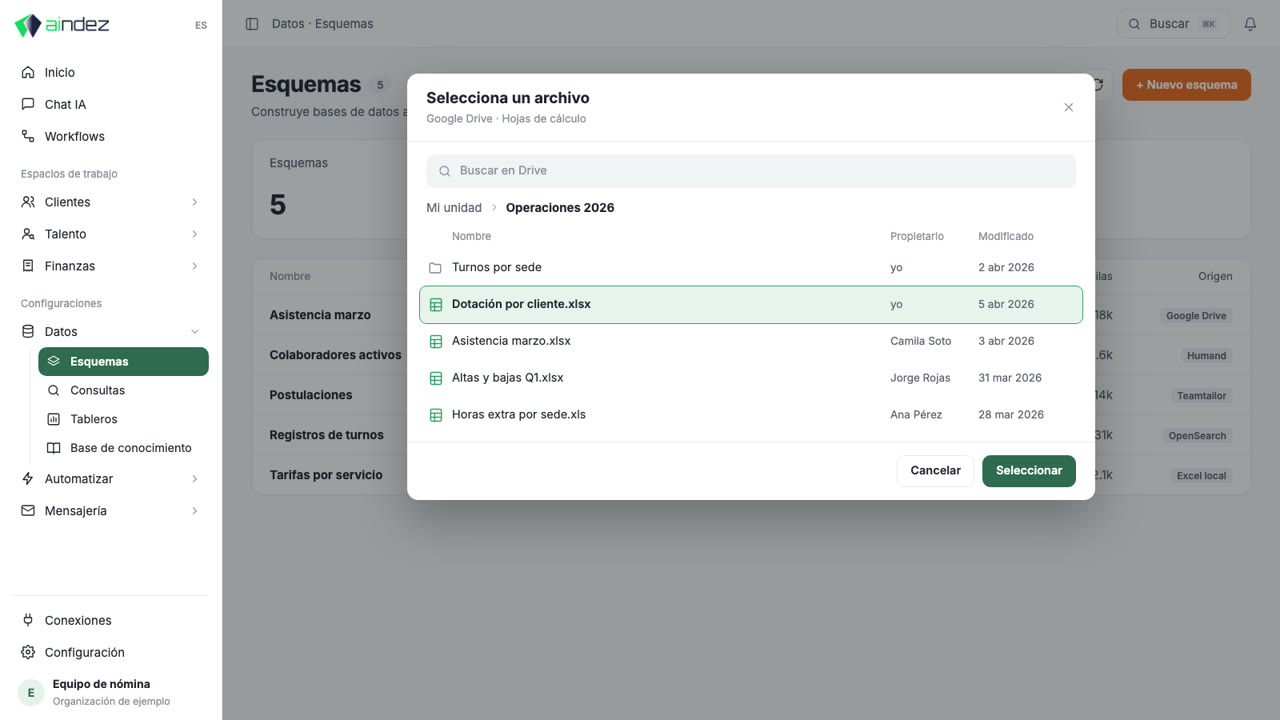
A good part of operations lives in spreadsheets stored in Google Drive: headcount per client, this month's attendance, shifts. Now Aindez brings them in straight from Drive, without downloading and re-uploading them, and puts them next to the data from your other systems.
As of this date, Aindez has 5 connectors.
Here's how it works, step by step.
1 · Connect your organization's Google Drive
In Connections you pick Google Drive and sign in with the Google account you want to use. Aindez asks for read-only access: it can see and download your files, but not change them.
2 · Pick the file with the Google picker
When you create a schema you choose Google Drive as the source, and the Google picker opens with your folders and Excel files. You pick one and, if you didn't type a name for the schema, it takes the file's name.
3 · Each sheet becomes a table
Aindez downloads the file and turns each sheet into a table in the schema, ready to query. The schema card shows it comes from Drive and takes you to the original file in one click.
4 · If the file changes, the schema updates
Aindez keeps an eye on the file. When someone edits it in Drive, it downloads it again and replaces the schema's data, so you don't have to import it again.
5 · Alongside Odoo, Humand, Teamtailor and OpenSearch
Drive joins Aindez's other four connectors. Odoo brings in your ERP data, such as invoices and contacts. Humand and Teamtailor bring in employees, candidates and job openings. From OpenSearch you choose which indexes to bring in, and each one becomes a table.
How we do it
- Read-only: Aindez reads your files, it doesn't change them.
- You choose what to bring in, file by file, with the Google picker.
- Each sheet is a table, ready to query.
- The schema follows the file: if it changes in Drive, it updates.
In technical terms
- The connection uses OAuth 2.0 with read-only access, and Aindez renews access without asking you to sign in again.
- The chosen file is downloaded in our backend, not in your browser, and each load replaces the previous one instead of duplicating it.
- On import, we subscribe to the file's changes: when it's edited, Google Drive notifies us through a webhook and we load it again.
- Those subscriptions last less than a day, so a scheduled task renews them before they expire.
- In Humand, Teamtailor and OpenSearch you choose areas, and each selected area becomes a table in the schema.
Your Drive spreadsheets and your systems end up in one place, ready to be cross-checked.