
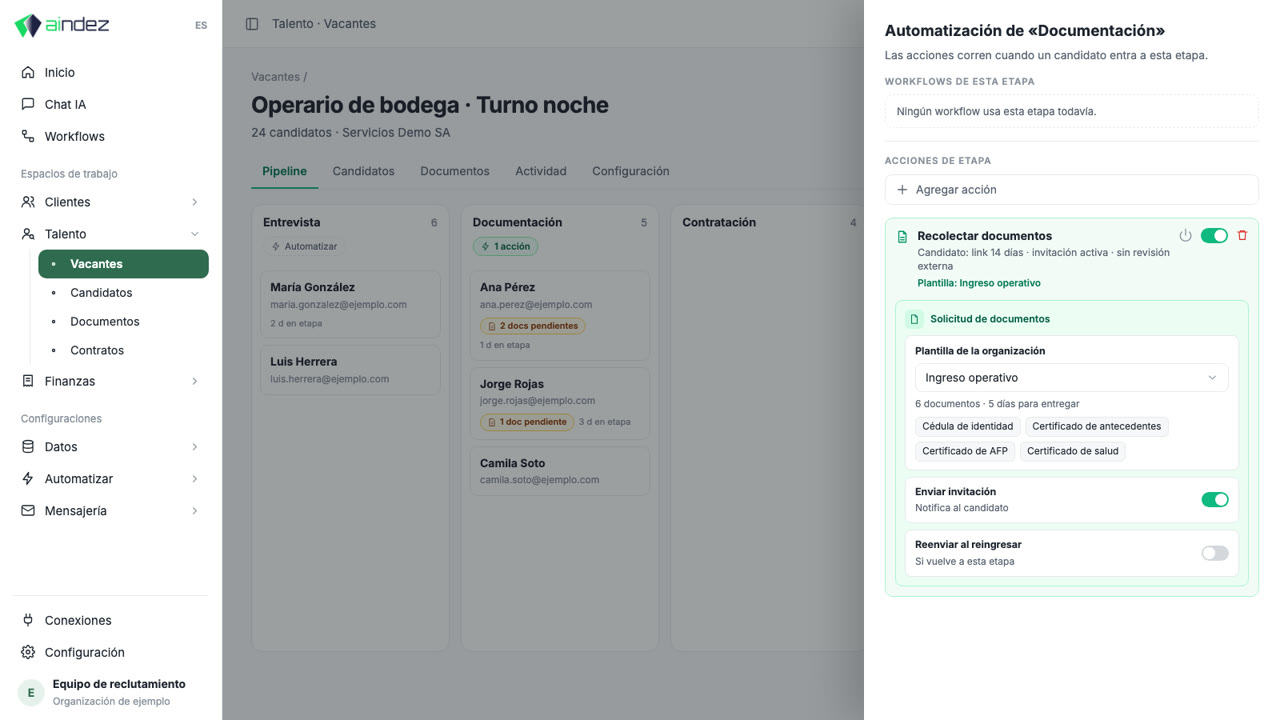
Asking for documents, chasing them and checking who sent what takes hours in any staffing team. Now each stage of the openings board can handle that, and your team only validates.
Here's how it works, step by step.
New1 · Ask for documents from a stage
You add the "collect documents" action to a board stage. When a candidate enters, Aindez creates the request and sends them a link to upload their files. If the candidate re-enters the stage, the request isn't duplicated.
New2 · Review and validate what arrives
Your team sees what was received and validates or rejects it. If a document has an expiry date, Aindez flags the ones that lapse.
New3 · No documents, no advancing
While required documents are missing, rejected or expired, the candidate doesn't move to later stages. You can move them back to an earlier stage or leave them where they are.
New4 · Use request templates
Templates are document lists you reuse across the organization. Each action picks a template and a due date. If you change the template later, requests already sent are not altered.
New5 · See what happened in each run
Each time the action runs, a record is kept with the candidate, the opening and the link that was sent. From there you can regenerate a link, resend the invitation or revoke access, and each operation adds a new record without erasing earlier ones. This feature has its own permissions, and the view is split into Tracking (progress, expiry, documents) and Configuration (templates and actions).
How we do it
- Each stage asks for its own documents, without duplicate requests.
- No one moves ahead with documents missing, rejected or expired.
- What was sent doesn't change, even if you edit the template.
- Everything is logged, without erasing what came before.
In technical terms
- The stage action is idempotent: if the candidate enters again, what already exists is reused instead of duplicated.
- For the document upload link we store only a hash, so the full link is visible only when it's generated.
- The server blocks moving to a later stage if a required document is missing, rejected or expired.
- Documents are marked "expiring soon" and "expired" automatically; by default, the warning comes 30 days ahead.
- History is never overwritten: regenerating, resending or revoking a link creates a new record.
No document goes unrequested, and your team sees at a glance what is missing.