
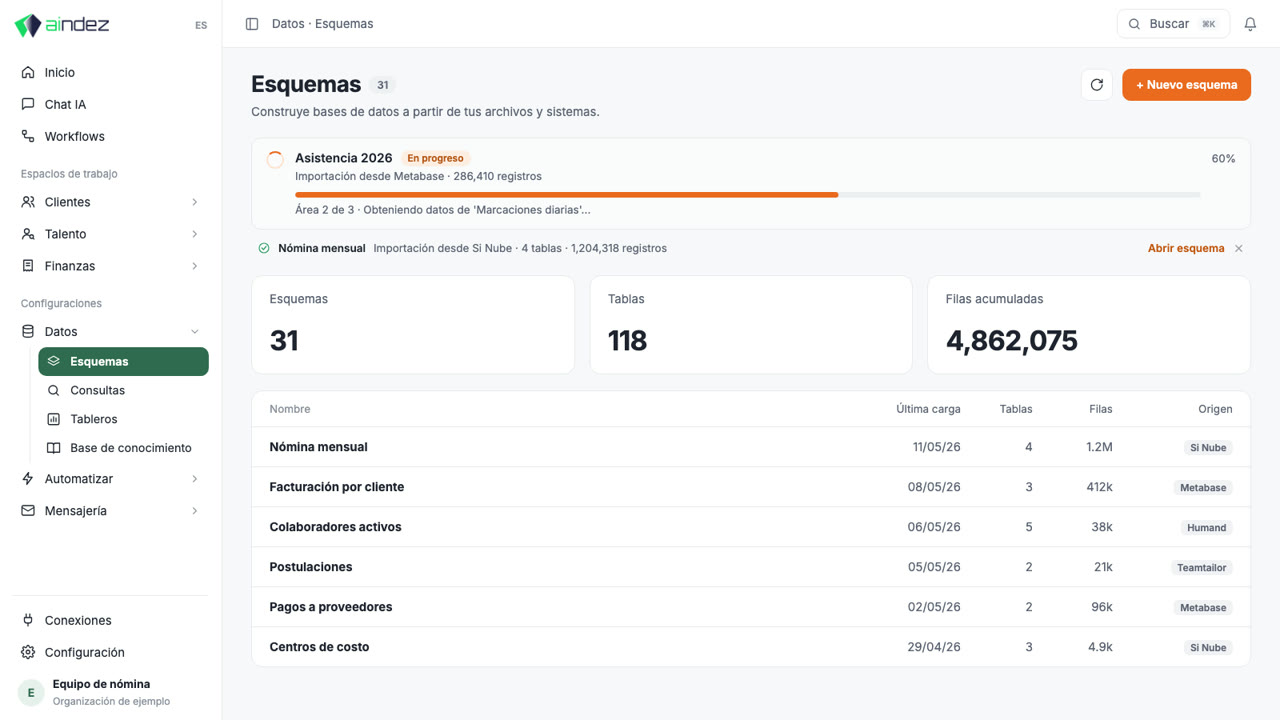
In April, Schemas already brought together your Excel files, your Google Drive folders and data from Humand, Teamtailor, OpenSearch, Si Nube and Metabase into tables. The limit was large volumes: the import asked for everything in a single block, with little time to answer, so a heavy query ended in an error. Now data arrives in parts and the import tells you what's happening.
Here's how it works, step by step.
1 · Data arrives in parts
When you import a Metabase or Si Nube query, the result no longer travels as a single block. It arrives record by record and builds up until it's complete, so a large query doesn't get cut off halfway.
2 · More time for heavy queries
Importing from your systems now waits up to 10 minutes for the answer. Before, it had 30 seconds, like any other call, and a heavy query couldn't finish in time.
3 · You see progress while it imports
When you create a schema from Metabase, a bar shows where the import stands: connecting to the system, fetching each query's data, how many records have arrived and saving the schema.
4 · If it arrives incomplete, you're told
Aindez compares the records it received with the total the system reports. If some are missing, it saves what arrived and tells you how many records were imported out of how many, so you don't work with an incomplete table without knowing it.
5 · Errors that tell you what to do
If the import fails, the message explains why and what to do next. For example, that the query returned too much data and should be filtered or given a shorter date range, that it took too long, or that it points to a table that no longer exists.
How we do it
- We receive data in parts, not in a single block.
- We give heavy queries time, without cutting them off halfway.
- We show you the progress while it imports.
- If something is missing, we say so, with how many records arrived.
In technical terms
- Metabase and Si Nube deliver the result as a stream of lines, one per record, which we read as it arrives.
- Progress reaches the browser through server-sent events, so the bar moves without reloading the page.
- Imports use their own connection with a longer timeout, without making every other call wait longer.
- We compare the records received with the total the source reports; if they don't match, the import is marked as partial.
- Before saving the new data, we save a version of the schema so it can be restored.
Your large queries reach your schemas complete, and when something doesn't add up, you know what happened and what to do.