
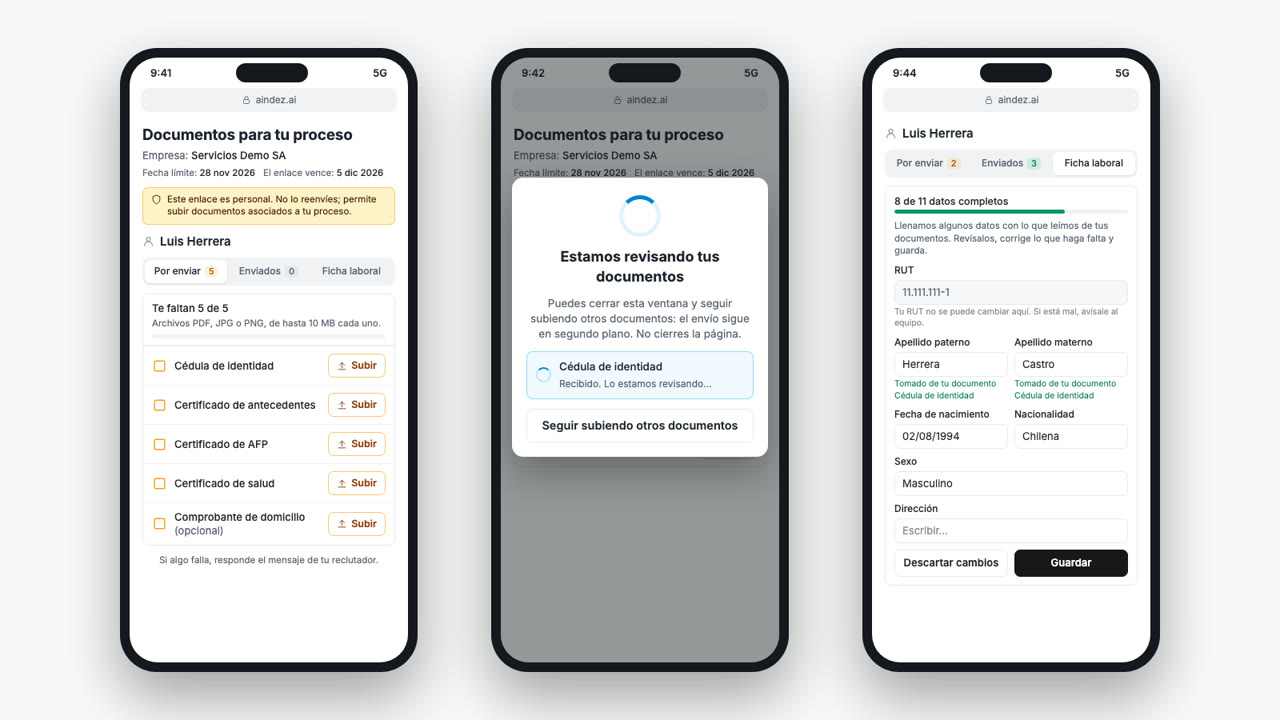
Asking for documents through scattered messages creates back and forth: candidates don't know what's missing and your team doesn't know what arrived. Now the link Aindez sends shows everything on one screen, and your team reviews what came in without leaving the board.
Here's how it works, step by step.
Improved1 · The candidate sees which documents are missing
The upload link organizes everything in three tabs: "To send", "Sent" and "Work profile". They update on their own every time the candidate uploads a document, and each document has its own row.
New2 · Upload each document from its row
The candidate uploads the file in the matching row, and a window shows the upload's progress.
New3 · Review a prefilled employee record
The record comes with the candidate's identity already filled in. They review it, correct it if needed and send it. The Chilean record format is turned on per organization.
Improved4 · Your team reviews from a side panel
The requests board updates itself when something changes, and each request is placed according to the flow's required documents. Your team opens each one in a side panel and reviews it without leaving the board.
Improved5 · Adjust a flow and the openings update
Flows can be duplicated. If you edit one, the requirements of the openings it's attached to are updated. When you resolve an intake, the candidate moves to the opening's first stage and the notice tells you which one.
How we do it
- One screen: what's missing and what's already sent.
- Verification comes first, then the data.
- Your team sees changes as they happen, without reloading.
- A change to the flow reaches all its openings.
In technical terms
- Before showing any data, the link asks for a verification code and acceptance of the consents.
- Candidates see only a few identity fields: the RUT can't be changed, and the server validates the rest.
- The board updates live: the notice carries no data, and each user re-reads with their own permissions.
- Editing a flow updates the requirements of its openings, without touching other openings or manual requirements.
- When an intake is resolved, the candidate enters the board's first stage; if they already have a card, it stays where it is.
Fewer messages back and forth: candidates know what to upload, and your team sees right away what is left to review.