
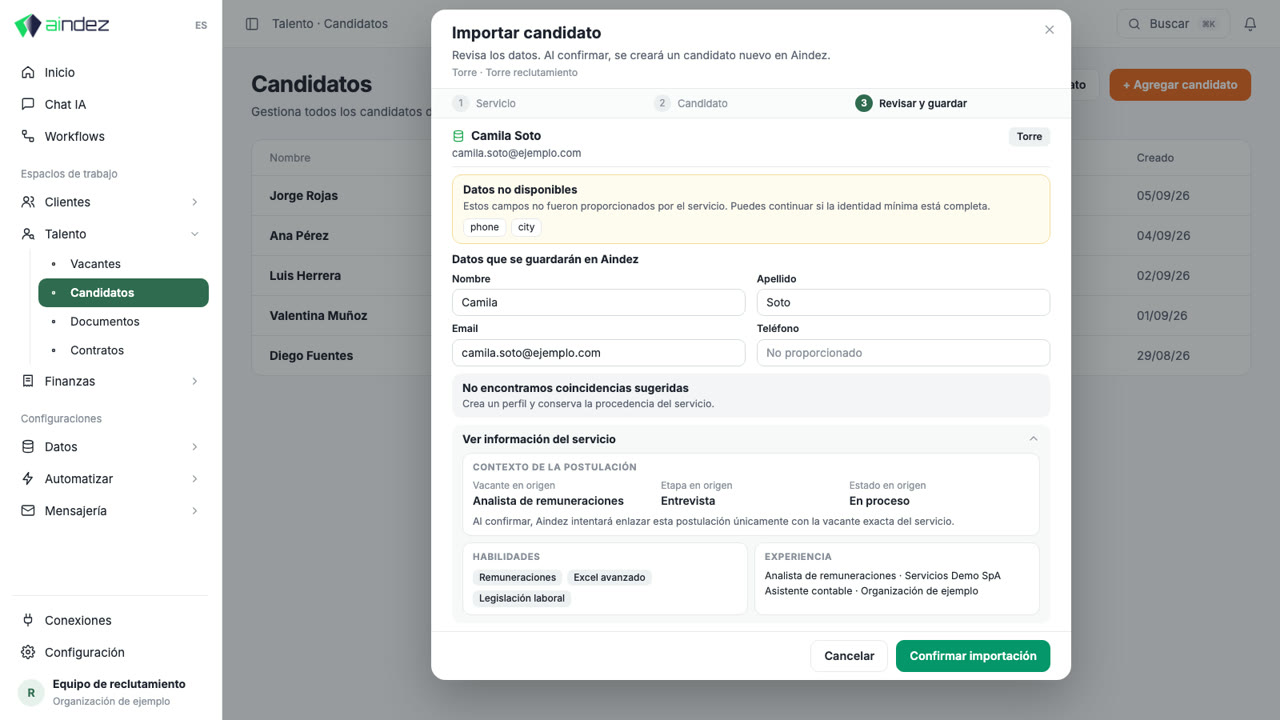
Candidates and openings in Torre often end up copied by hand into other systems. Aindez now connects to Torre in read-only mode and brings that data in, without writing anything to your account.
As of this date, Aindez has 25 connectors.
Here's how it works, step by step.
New1 · Connect Torre in read-only mode
From the integrations catalog you connect Torre with an API key, which is stored encrypted in your organization. The connection is read-only: any attempt to write to Torre, or to use a route or parameter that isn't allowed, is rejected before it gets there. Logs don't store the key. You can set up more than one Torre connection.
New2 · Bring in openings and recruiting data
Aindez queries the openings in your Torre account. When you create a table in Aindez, Torre shows up as a source with five areas: openings, applicants, stages, screening questions and alignments. The data is available to queries and workflows, with the source opening kept as a reference.
New3 · Import candidates with a review first
In the candidate import, Torre appears alongside the other sources. You search applicants across your Torre openings, review the application status, skills and experience, and see which optional fields are missing before you confirm. When it finishes, Aindez reports how many records were processed, created, updated, skipped or failed. The application is only created or updated when exactly one Aindez opening matches the Torre one, and running the import again doesn't duplicate records.
How we do it
- Read-only: Aindez can't write to your Torre account.
- Your key stays protected: encrypted and out of the logs.
- You review before importing, and running it again doesn't duplicate.
- No clear opening, no link: we don't make one up.
In technical terms
- Each connection's API key is stored encrypted, and the service that runs workflows never receives it.
- Every call goes through your organization's proxy, which only lets authorized reads through.
- We read your openings and their applicants without losing track of which opening each record came from.
- Candidate matches are suggested by email or phone plus name, but they're never linked automatically.
- The application is only created when it matches exactly one opening; if there's any doubt, nothing is written.
You get Torre candidates and openings in your process without copying data by hand and without any risk of changing your account.