
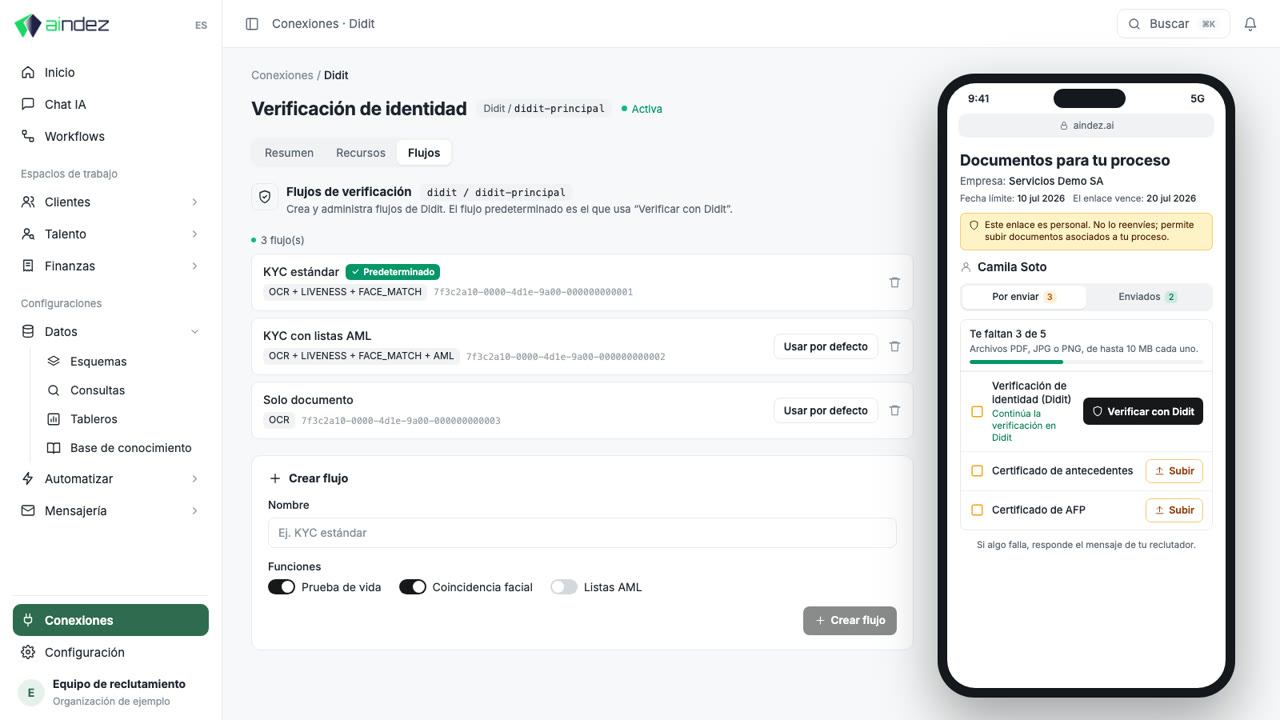
Confirming that the person uploading documents is who they say they are is often done by hand, or not done at all. Now Aindez connects to Didit and asks for it as part of the same document process.
Here's how it works, step by step.
New1 · Connect Didit with just the key
You enter your Didit account key. Aindez checks it with a read-only request and sets up the standard verification workflow. If part of the automatic setup is left incomplete, the connection stays available and you retry just that step.
New2 · Add it as an identity requirement
In the document flow builder, Didit appears as a single identity requirement, not as one more document. You choose it flow by flow, so your other flows don't change. If you rename the document later, the choice is kept.
New3 · The candidate verifies from their link
While the Didit session is active, the link for uploading documents updates on its own, including when the candidate returns to the tab. When it ends, it shows the result and blocks the action if the verification was completed, rejected or needs review.
New4 · Manage Didit workflows from Aindez
From the connection you see your Didit workflows, choose the default one, and create, edit or delete workflows without leaving Aindez. Didit's workflows, sessions and events can also be brought in as data, to query alongside your other tables in Aindez.
How we do it
- We only ask for the key, and we test it before saving it.
- Identity is one more requirement in the document flow.
- We only accept results signed by Didit.
- Candidates see their result without reloading the page.
In technical terms
- We validate your Didit key before saving it; it stays on the server and the screen only shows it masked.
- Automatic setup creates a standard verification flow in Didit and the webhook that sends us the results.
- Every notification from Didit is signed with HMAC: we reject any that don't match or arrive too late.
- Each flow allows a single Didit identity requirement, and the server enforces it even if two people edit at once.
- The link checks the status while verification is in progress and stops once there's a final result.
You verify identity inside the same process, with no separate manual steps.