
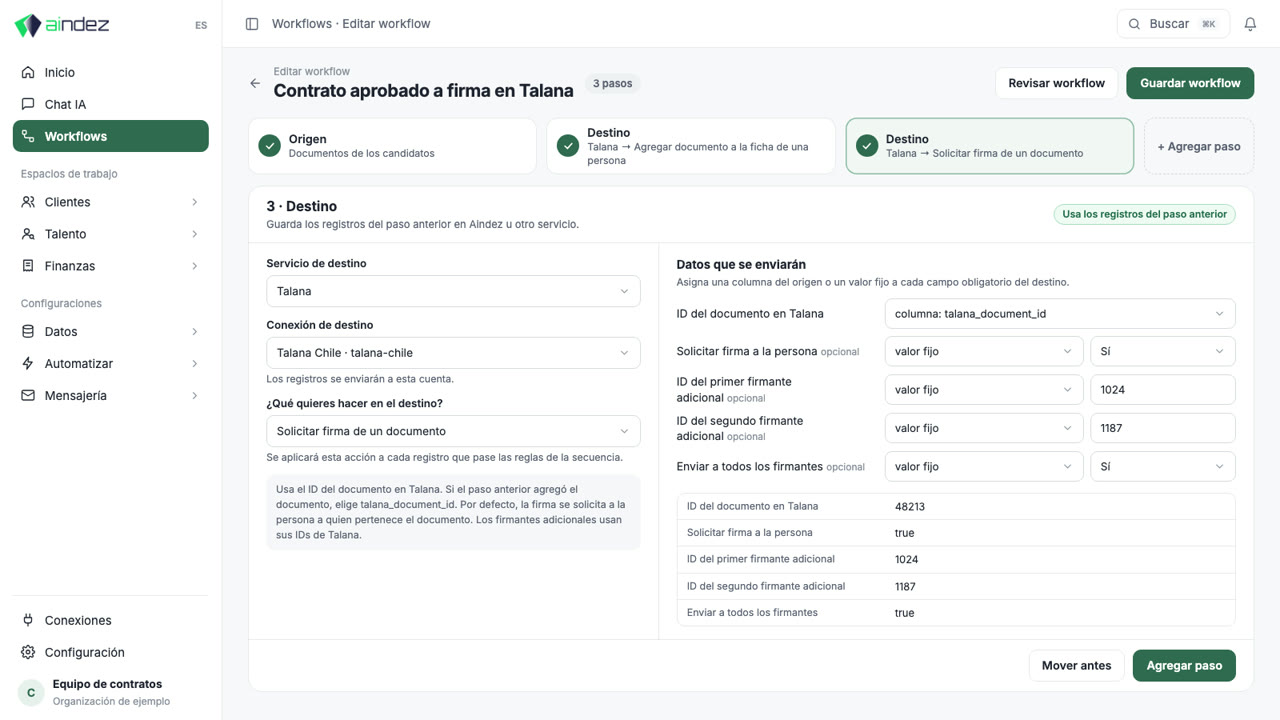
Moving an approved candidate's data into Talana, uploading their documents and requesting the contract signature is usually repetitive manual work. Aindez now orchestrates it on top of your Talana, and your team keeps using Talana as usual.
As of this date, Aindez has 26 connectors.
Here's how it works, step by step.
New1 · Contracts, documents and signatures in Talana
With Talana connected, Aindez looks up the worker by RUT, creates, queries and updates their contract terms, uploads and queries documents, and requests and queries e-signatures. The signature is requested from the worker by default and supports up to two distinct counterparties. Aindez validates the data before sending it, keeps contract contents out of its logs and does not delete documents in Talana. If Talana responds with something invalid, you get a clear error.
New2 · Set it up step by step in your workflows
In a workflow you choose which documents to upload and which signatures to request, step by step. When several documents need signing, the signatures are chained. Aindez respects Talana's usage limits: if it asks to wait, Aindez shows it, and a write with an uncertain result is held for review instead of being repeated.
Improved3 · Writes to the connection you chose
If your organization has several Talana connections, Aindez writes to the one you selected and not to another. It verifies credentials when you save the connection and keeps that selection across operations, imports and when retrying a handoff.
How we do it
- We only write to the connection you chose, never another.
- We validate before sending, and we don't delete documents in Talana.
- We respect Talana's limits: if it asks us to wait, we show you how long.
- We don't repeat a write with an unclear outcome: without confirmation, it goes to review.
In technical terms
- Aindez uses the Talana API to create and update contracts and then request their signature.
- Every request is validated against Talana's official documentation, and contract data stays out of the logs.
- The signature goes to the worker and up to two counterparties, and requests with repeated signers are blocked.
- If Talana asks us to wait, we respect its window, and writes are never retried automatically.
- When a connection is saved, we verify the credentials with a real read-only call.
You get less retyping, fewer errors between systems and contracts that move to signature without forgotten steps.