
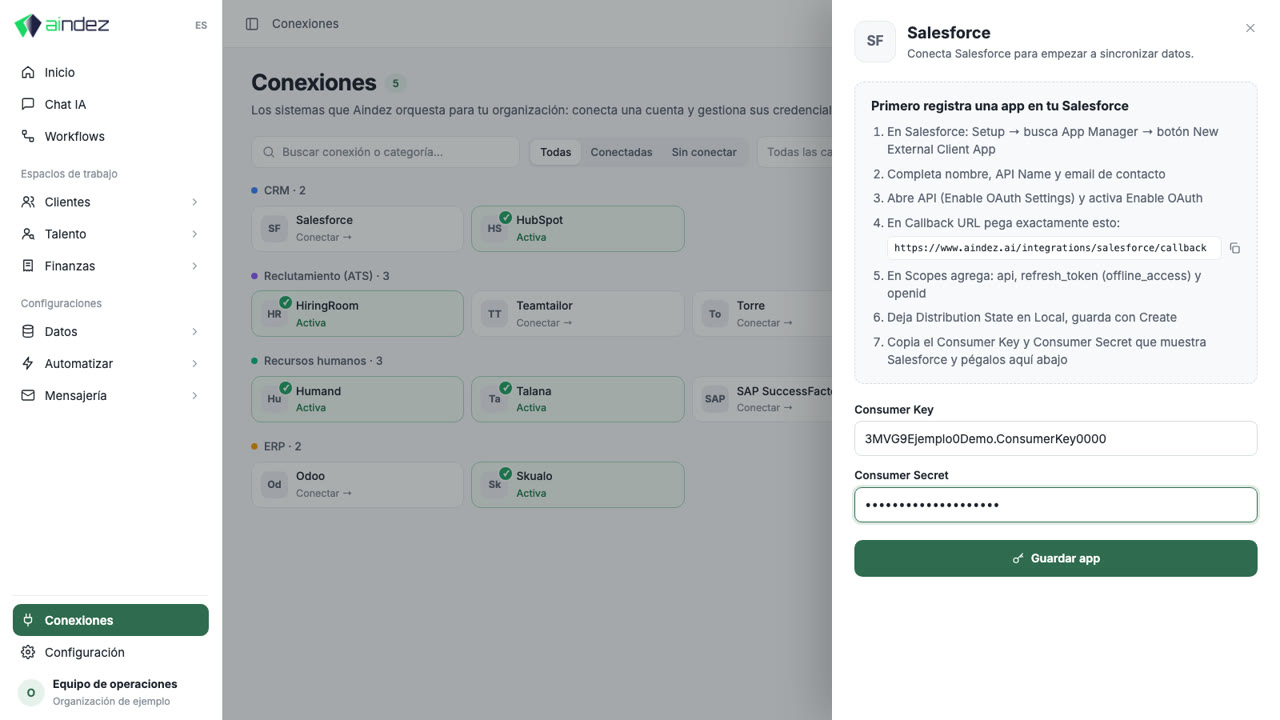
Customer and deal data lives in your CRM, and cross-checking it against candidates or openings is usually done by hand. Now you connect Salesforce or HubSpot and Aindez works on that data, without you changing CRMs.
As of this date, Aindez has 21 connectors.
New1 · Connect Salesforce with your organization's app
Salesforce limits the app to users of the account that created it, so each organization registers its own in its own Salesforce; there is no shared Aindez app. You sign in with your Salesforce account, and you can use sandbox mode if you need it.
New2 · Follow the tutorial inside Aindez
Until the app is configured, Aindez shows you the path step by step: Setup, App Manager, new External Client App, callback address, scopes and Local distribution. There's a form to save the key and secret. Aindez computes the callback address for the environment you use, and the connect button appears only when everything is ready. Disconnecting Salesforce also deletes the app's credentials.
New3 · Connect HubSpot
HubSpot also connects as a data source and provides six areas: contacts, companies, deals, tickets, products and line items. Standard properties are read from each one.
How we do it
- Each organization uses its own Salesforce app, as Salesforce now requires.
- We never see your Salesforce password: you sign in there and authorize access.
- Disconnecting means starting over: access and app keys are deleted.
- HubSpot connects with a private app token, stored encrypted.
In technical terms
- Salesforce connects with OAuth 2.0: you authorize access once, in production or sandbox, and the connection stays active.
- The authorization flow is signed by our backend, so each connection lands in the right organization and environment.
- We read Salesforce and HubSpot through their official APIs, going through every page of results.
- Tokens and keys are stored encrypted per organization.
- Tables from both sources can be refreshed on a schedule.
Your CRM data becomes available to your workflows, with nothing exported or copied by hand.