
There are questions your team asks the chat every day: which candidates are still pending, which invoices are due this week. Now you can schedule them. The routine asks the agent at the time you choose, and the answer is waiting for you in the chat.
Here's how it works, step by step.
1 · An instruction, in your own words
In Routines you create a routine with a name and an instruction, written the way you'd write it in the chat. The agent runs it with the same tools and the same organization context it uses when you talk to it.
2 · You choose when
A routine can run at a set interval, every day, on a day of the week or on a day of the month, at the time you set and in 15-minute steps. If you need something finer, it accepts a cron expression. Before you save, a preview tells you in one sentence when it will run.
3 · Every run is saved as a chat
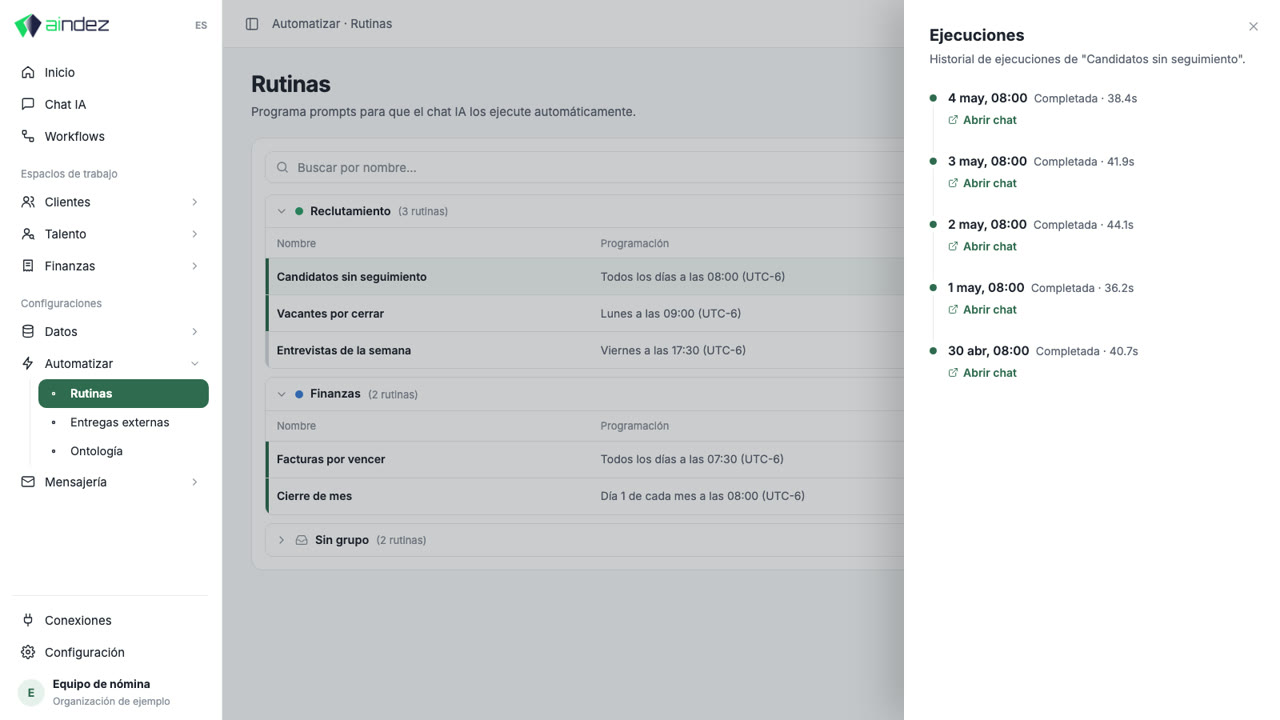
Each time it runs, the routine opens a new conversation with its name and the date, which shows up in your chat history. In "View executions" you see when it ran, whether it finished, how long it took and the error if it failed, with a link to open the chat and keep the conversation going from there.
4 · Run now, pause and a time limit
"Run now" runs it on the spot without moving its next run. You can pause it and reactivate it whenever you want. You also give it a time limit: if a run goes over it, it's canceled and marked as "Timed out".
5 · Groups to keep them organized
Group your routines by topic, each group with its own name and color. Groups open and close, and the page remembers which ones you left open. If you delete a group, its routines aren't deleted: they move to "Ungrouped".
How we do it
- You ask the agent once, and it repeats it on its own.
- Every run leaves a chat you can open and continue.
- A routine never runs twice at the same time.
- Your routines, organized in color-coded groups.
In technical terms
- A scheduler periodically checks which routines are due and runs each one with the same team of agents as the chat.
- Each routine is reserved with a database lock, so two servers never run it at the same time.
- The next run is calculated from the schedule type, including standard five-field cron expressions.
- Each run stores its status, duration and error, and stays linked to the conversation it created.
- Creating and managing routines requires its own permission, and groups belong to each user.
Everyday questions answer themselves, and your team finds the answer in the chat when they need it.