
Preparing the contract, sending it for signing and remembering to save the PDF are manual tasks repeated with every hire. Now an Aindez workflow does them when the candidate reaches the stage you choose, and your team approves before anything goes out.
Here's how it works, step by step.
New1 · Connect Firma.dev
Firma.dev is available in Connections, with its workspaces, templates and signing requests. If a send is retried, a second signing request is not created.
New2 · Add the "Sign a contract" step
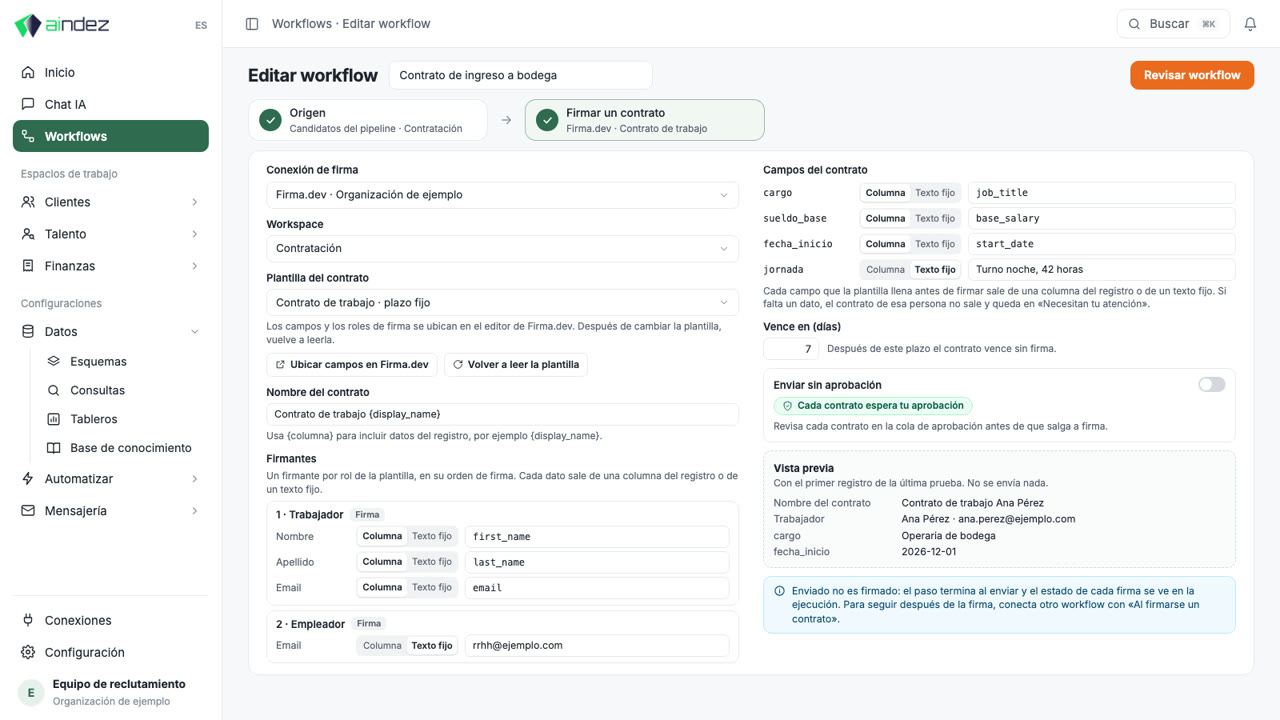
Connect the step to a stage of the opening: when the candidate enters that stage, they receive the contract. You choose the connection, the workspace and a template (or upload a base contract), review one signer per role, and assign each template field a column or fixed text, plus the contract's name and expiry.
New3 · Review before sending
The preview uses the first row of your latest test and never sends anything. By default, the contract waits for your approval before going out. If signer data is missing, the person is held as an exception and nothing is sent.
New4 · Follow the status and save the signed PDF
A sent contract is not a signed one: each signature's status shows in the workflow run. Returning to the stage or repeating the event does not send a second contract. When everyone has signed, the final PDF is stored next to the candidate's data as a new version of the "Signed contract" document.
How we do it
- One contract per person, even if the step runs again.
- Your team approves before it goes out.
- Sent isn't signed: we track every signature to the end.
- The signed PDF is stored automatically, and retried if it fails.
In technical terms
- Every send is idempotent: if it's repeated, it returns the first request and no second contract goes out.
- If we're unsure whether a send went through, we never blindly resend: we first look for it in Firma.dev.
- Firma.dev notices are verified with an HMAC signature; if the signature is invalid, nothing is written.
- Statuses only move forward, never back, even when notices arrive out of order.
- The signed PDF is copied with automatic retries and stored with a fingerprint that proves it hasn't changed.
Fewer manual steps per hire, no duplicate contracts, and the signed PDF always at hand.