
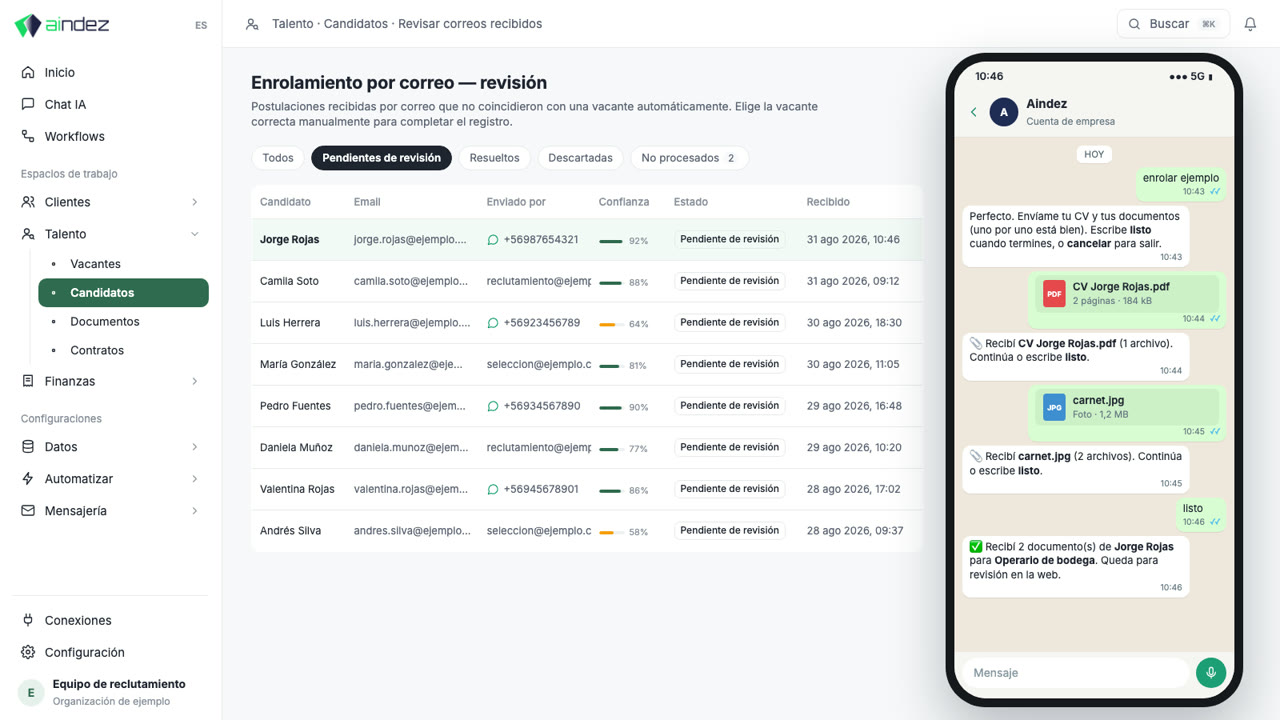
Many candidates have their documents on their phone, not on a computer. Asking them to email the files and then retyping the data takes your team's time. Now it's enough to write on WhatsApp, and Aindez prepares the request for review.
Here's how it works, step by step.
New1 · Write "enrolar" and send the documents
When someone writes "enrolar" on WhatsApp, Aindez opens a session and keeps every document, image or text that arrives afterwards. Writing "listo" processes everything together with the same data reading used for email enrollment, and Aindez replies with the candidate name and opening it detected. "Cancelar" discards the session.
New2 · Your team reviews what the AI prepared
The request lands in the review screen, which shows it was received by WhatsApp along with the sender's phone number. Your team reviews and resolves it.
New3 · The candidate needs no account
Candidates write "enrolar" followed by your organization's identifier and send their documents. It also works for a number that exists as a user but has no current organization or permissions. Attempts to identify the organization are rate limited per phone number to prevent abuse.
New4 · Send the document upload link
A workflow that notifies by WhatsApp can include the link for the candidate to upload their documents. The link is generated on each send for their open document request, is shorter than before, and shows its own title and description when shared. If the candidate has no open request, the case goes to exceptions with that reason instead of being sent.
5 · See how each candidate arrived
The candidate's profile shows whether they signed up by WhatsApp or by email, with easy-to-read labels. That information is also available to filter on your boards.
How we do it
- One word starts and ends the submission: «enrolar» and «listo».
- What arrives by WhatsApp is read the same way as email.
- Your team reviews before anything moves on.
- The document upload link is new on every send, and it expires.
- You know how each candidate arrived: by WhatsApp or by email.
In technical terms
- Messages reach our backend through a WhatsApp Business API webhook.
- Each candidate submission closes on its own after 15 minutes and has a limit on files and size.
- On close, an AI model extracts the data, classifies the documents, and the request lands in human review.
- If candidates write in on their own, they give the organization's identifier, with limited attempts per phone.
- Each document upload link is new, expires and asks for a verification code; we only store its hash.
You get documents that arrive through the channel candidates already use, with no retyping and your team reviewing before anything moves on.