
When a contract gets signed, the PDF usually ends up in an email or a folder, far from the candidate's and the client's data. Now Aindez keeps the signed contract next to that data and uses it to move the process forward.
Here's how it works, step by step.
New1 · Find the contract in the candidate profile
Signed contracts appear in the candidate profile. From there your team opens or downloads the final PDF. Whoever can see the profile also sees its contracts.
New2 · Review contracts by worker and by client
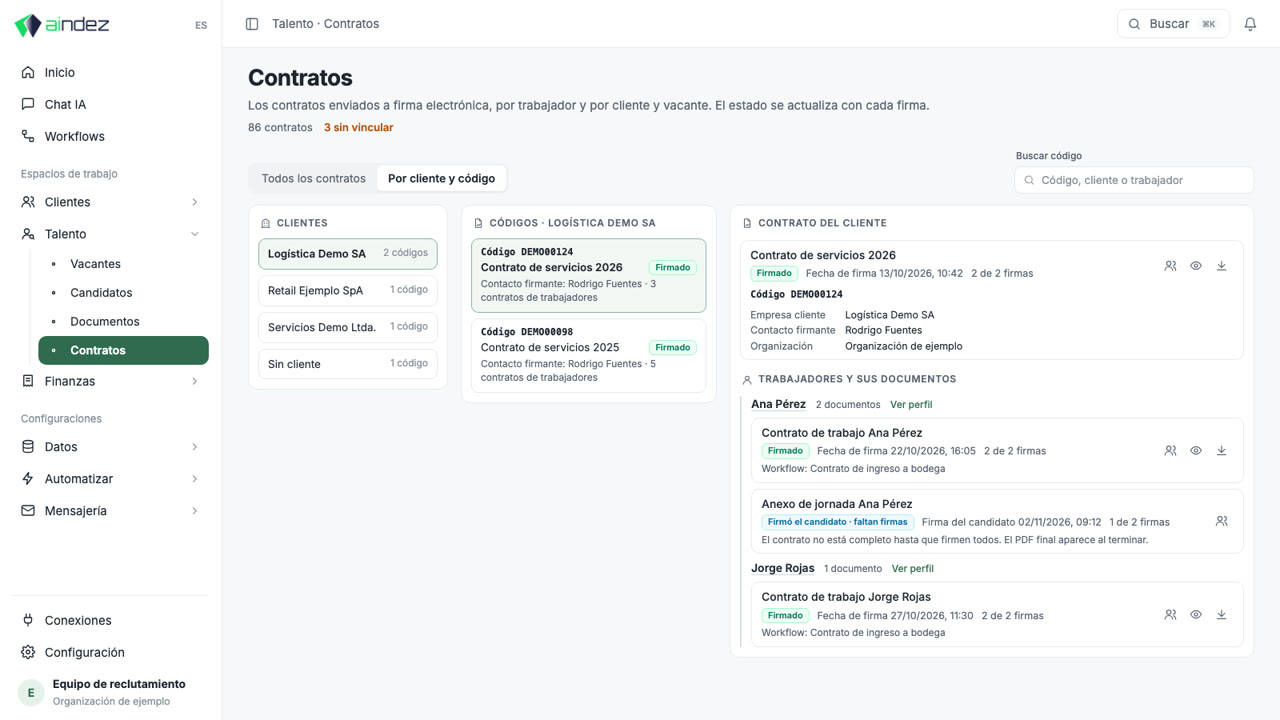
In Talent, the Contracts section has two views. "All contracts" filters by worker, client, opening and status. "By client and staffing agreement" shows each client with its staffing agreement (the contract under which the client takes on workers from your agency) and the contracts of the workers linked to it. Whoever can edit candidates links or unlinks contracts and changes the client.
New3 · Send the signing link by WhatsApp
After the "Sign a contract" step, the "Send WhatsApp" step sends the candidate their own signing link. If the contract can no longer be signed, the message is not sent and the case is held as an exception, with the reason visible to your team.
New4 · A signed contract starts the next workflow
A workflow can start when a contract is signed in your e-signature connection. It fires only when all signatures are in and the final PDF is stored: a partial signature, a rejection or an expiry starts nothing.
How we do it
- Whoever can see the candidate sees their contracts, and no one else.
- Each signing link reaches only the person who must sign.
- One message per contract, even if the step runs again.
- Only a completed contract starts the next workflow.
In technical terms
- The signed PDF opens through a temporary link and only exists once every signature is complete.
- Anyone who can't see a candidate or their application can't see their contract either, and each worker sees only their own.
- The signing link is only sent if the candidate's email and phone match exactly one signer.
- Each message is idempotent: a retry doesn't duplicate the send, but a new contract does send its link.
- A signed contract starts the workflow only once, and never if it was signed before the workflow was created.
Your team finds each contract where they look for it, and the process keeps going on its own once the signature is complete.