
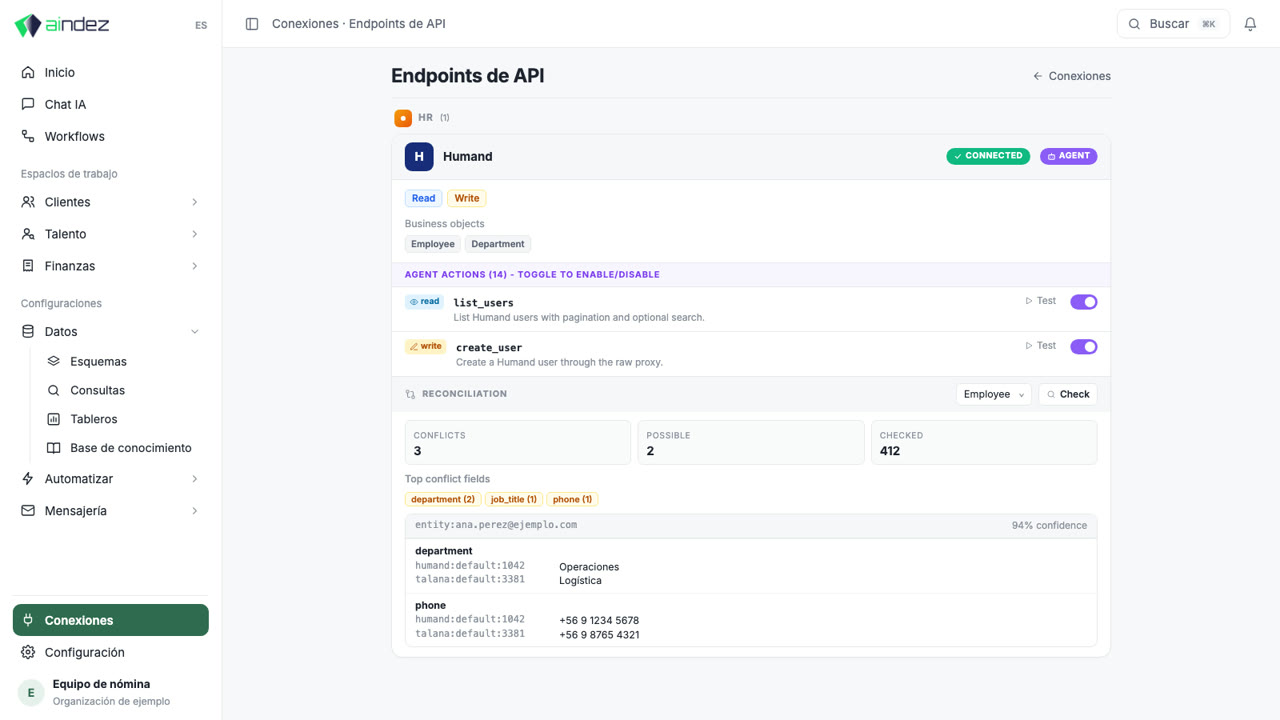
Until now, each Aindez connector was built its own way. Now they're all described the same way: what data they provide, what actions they accept and what notifications they send. With that, Aindez shows you what it can do with each system, how it's working and where your systems don't say the same thing.
As of this date, Aindez has 7 connectors.
Here's how it works, step by step.
1 · A connector is described through configuration
A new connector can be defined in a configuration file: where to read each type of data, what its fields are called in Aindez's common format and which actions it allows. Actions that write to the other system require approval by default.
2 · Badges showing what each system can do
In the Connections endpoints view, each system shows badges with its capabilities: read, write, events, files, search, identity, analytics or messaging. Below them are the business objects it provides, such as employees, departments or candidates.
3 · Reconciliation across your systems
You pick an object type, for example employees, and press "Check". Aindez looks for records that seem to be the same person in different systems and shows how many conflicts and possible matches it found, the fields that differ most and the value each system holds.
4 · The chat uses the same connectors
From the chat you can query a connected system, review its events or ask it to look for conflicts across systems. When an action writes to another system, the chat first simulates it and shows you what it would do; it runs it only after you confirm.
How we do it
- Every connector is described the same way, whatever the system.
- You see what each one can do before you use it.
- We find where your systems disagree, field by field.
In technical terms
- Every connector declares its capabilities, business objects and actions through the same contract, whether it's code or configuration.
- Each system's data is translated into common objects, such as employee or candidate, so it can be compared across systems.
- To reconcile, we compare normalized email, phone and name, and every match comes with its confidence level.
- Actions that write to another system are simulated first and require approval before they run.
- Each system's notifications arrive by webhook and are published as events on a queue in our backend.
Your systems stay the same; now you see what each one does, how it's doing and where they disagree.