
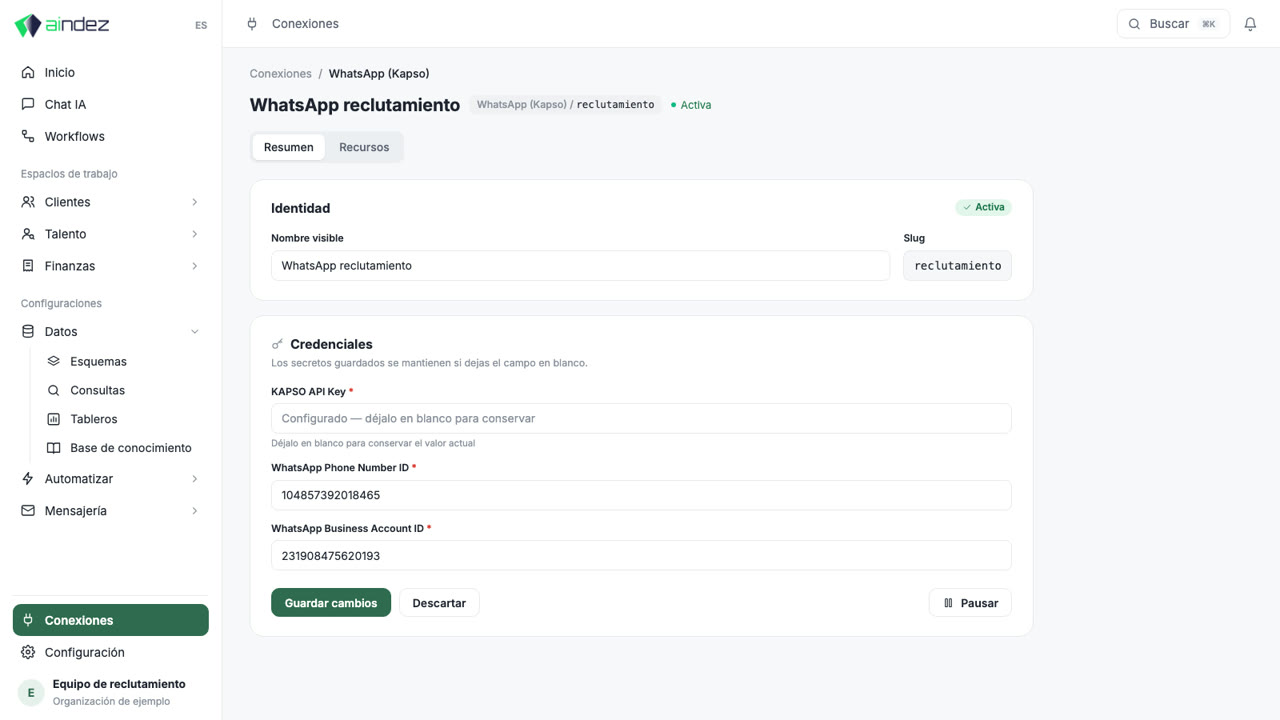
Your candidates and workers are already on WhatsApp. For Aindez to message them from your own number, you first have to connect it.
Here's how it works, step by step.
New1 · Register Kapso as a connected account
In the connected-accounts flow you choose Kapso, fill in the credentials and can edit them whenever you want. Each organization connects one WhatsApp number, with its own configuration.
Improved2 · Follow the connection status
Aindez records the health of each connection: how fast it responds, how many errors it has and when the last operation happened. If something fails, it retries, waiting a little longer each time, before marking the connection as failed.
Improved3 · Errors that say what happened
If the Kapso instance is inactive, the message says so explicitly instead of showing a generic failure.
How we do it
- Each organization uses its own number, with its credentials stored separately.
- If the connection fails, we retry before marking it as down.
- We track the health of every connection: speed, errors and last operation.
- Errors say what happened, not just that something failed.
In technical terms
- Your WhatsApp Business account credentials are validated on save and encrypted; only an administrator can change them.
- On every send we use your organization's configuration; if you don't have one, the platform account is used.
- If a call fails, it's retried automatically a few times before it's marked as failed.
- A circuit breaker pauses the connection after several failures in a row and reopens it only after a successful test.
- Each connection keeps a record of its health, so you quickly see whether something is failing and where.
Your number is ready and, if something goes down, you know where to look.