
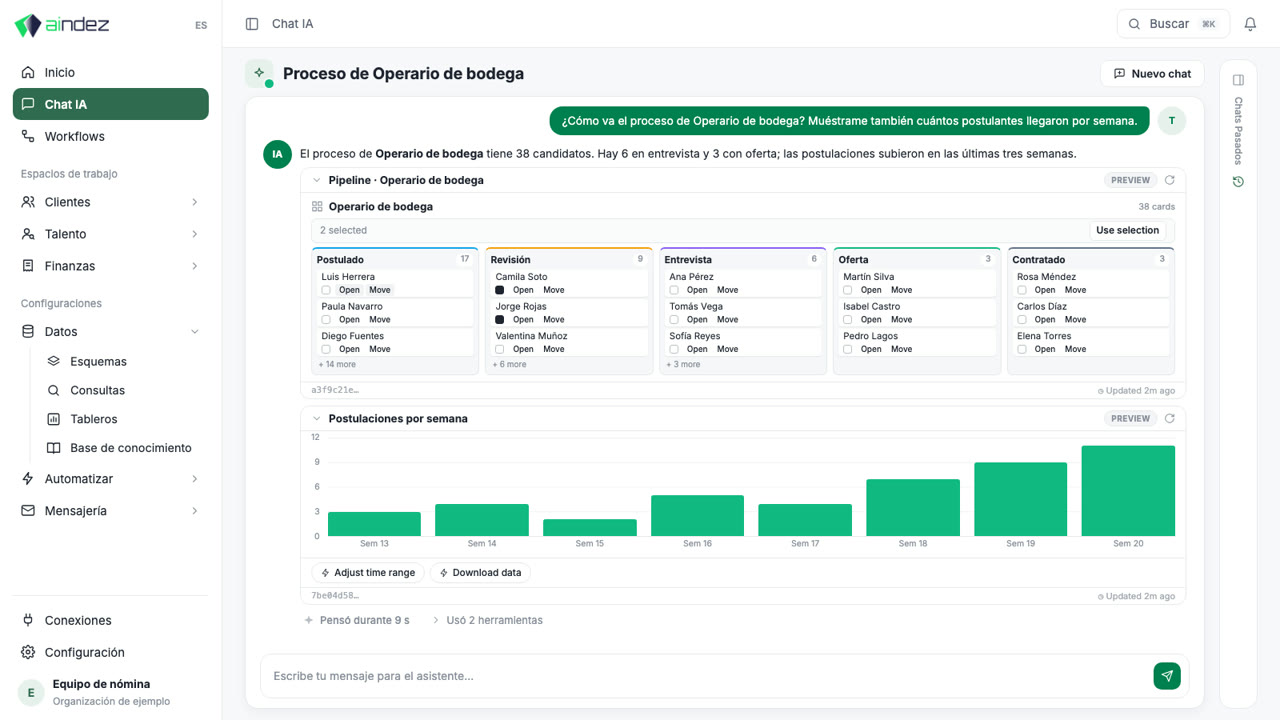
Until now, the Aindez chat answered with text. Now, when an answer reads better as a table, a chart or a board, the chat shows it that way, with your data and with buttons to act without leaving the conversation.
Here's how it works, step by step.
1 · The answer arrives as a table, chart or board
If you ask about your candidates, your invoices or this month's payments, the chat can answer with a table or a chart. If you ask about a hiring process, it shows it as a Kanban board, with each stage and its candidates. It can also show a WhatsApp or email draft ready for review.
2 · Data that refreshes, with versions
Each table or chart loads with Aindez data and has a button to refresh it. If the chat builds the same result again, you can pick an earlier version and go back to the latest one.
3 · You act on the result
On the Kanban board you can open a candidate, move them to another stage or select several and use that selection in the conversation. On a chart you can download the data as CSV, and on a candidate table, send them a WhatsApp message or schedule an interview.
4 · Anything that sends or rejects asks for confirmation
Actions that send something or change a person's status, such as sending a WhatsApp message, an invoice reminder or rejecting a candidate, first open a confirmation dialog. Nothing goes out until you confirm.
5 · The answer first, the reasoning collapsed
The answer text appears first, with tables and charts right below it. How long the chat thought and which tools it used sit on a collapsed line that you open only if you want the details.
How we do it
- We answer in the format that reads best: text, table, chart or board.
- You act where you see the data, without switching screens.
- Anything that sends something asks for your confirmation before it goes out.
- Every action is logged, with who did it.
In technical terms
- Each table or chart stores the query that produces it, so refreshing it brings current data.
- Each result type has a closed list of allowed actions; anything else is rejected in our backend.
- Before running an action, we check that your user has the permission that action requires.
- Every action carries an idempotency key: if the click repeats, it doesn't run twice.
- Every action goes into an audit log with the user, the result and a fingerprint of the content, without passwords.
You ask as usual, and the answer comes ready to work with.