

You can now connect Aindez to your favorite AI, in Claude Code or Codex. What you do in Aindez on screen, your AI can do for you: you ask in your own words and it takes care of it.
As of this date, Aindez has 21 connectors.
Here's how it works, step by step.
1 · Connect your AI in a minute
You install the Aindez CLI and sign in: the CLI shows you a short code that you approve in the browser with your usual account. From then on, your AI works in Aindez with your same permissions.
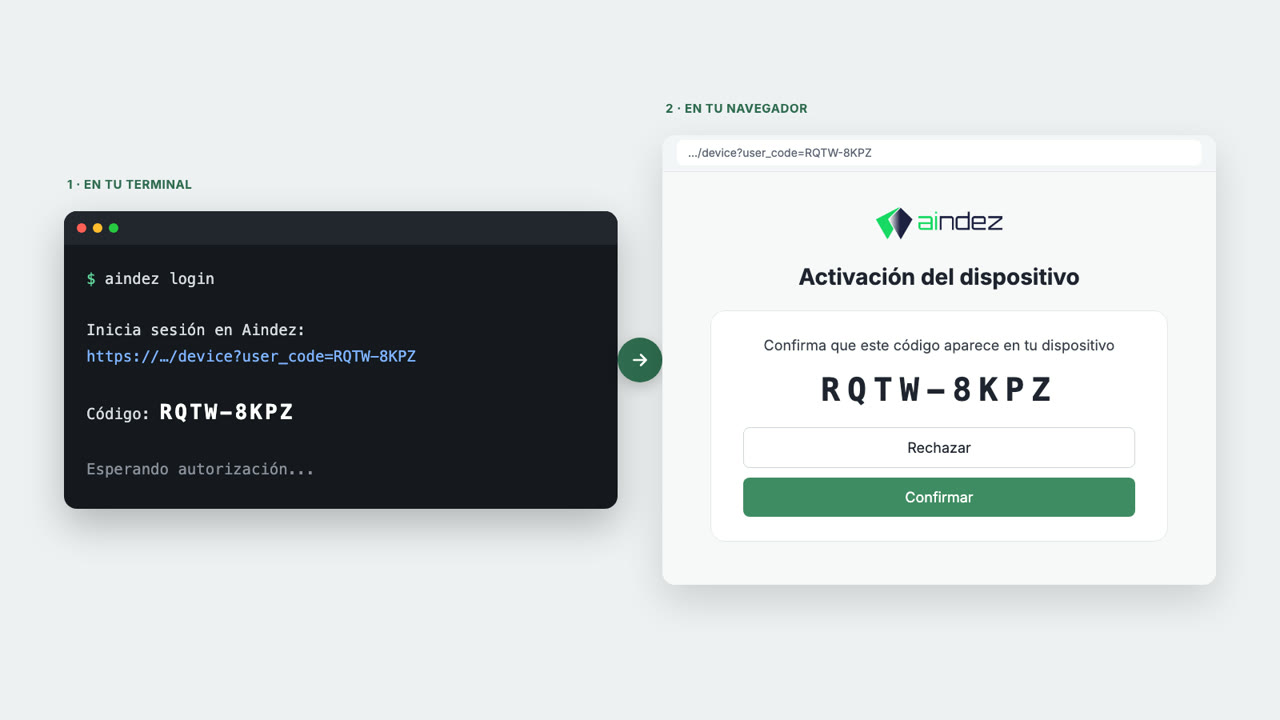
2 · Ask for what you'd do on screen
Your AI can create and update openings, move candidates, adjust pipelines and much more, just like you do in the interface. You talk to it like a teammate: "add the Medical exam stage after Interview".
3 · Ideal for bulk tasks
Where it shows most is in repetitive work. For example, adding a stage to the candidate pipeline of every one of your openings: on screen it's dozens of clicks; with your AI it's a single instruction.
4 · You approve before anything changes
Before writing, your AI shows you exactly what it's going to do and on which records. Nothing changes until you approve it, and each approval is valid only once.
How we do it
- Your AI does what you do, with your permissions.
- Bulk work, in one instruction.
- Nothing is written without your approval.
- A person signs in, never the AI.
In technical terms
- To connect, the CLI uses the OAuth 2.0 device flow: you approve a short code in your browser.
- Our backend authenticates every call with WorkOS and applies the permissions of your user and your organization.
- The AI only uses actions registered in a published catalog, with JSON responses designed for agents.
- Every write needs an approval tied to its exact arguments, and it's logged for audit.
- If a call is cut off, the result is marked as unknown instead of being blindly repeated.
Your AI handles the repetitive work in Aindez, and you decide what gets approved.